-->
Showing posts with label PSP Scripts. Show all posts

Saturday, October 19, 2013

All for Nothing!

You may have seen my previous post regarding my one year anniversary blow out sale.  Well…I am feeling crazy generous today as I have come to a realization!

One…I have been providing tuts and free materials and freebies since 2010.  That is three years worth of fun play time and materials to help you grow your design business. I have had such a time trying to keep up with things since I started my new job a year ago. Things are starting to settle down and I now come to a crossroad where I say….

Two…I plan to add new tutorials and will be offering new materials, methods, freebies, etc.  So….

Out with the old and in with the NEW! 

I am offering the original One Year Anniversary Package absolutely FREE!

That’s right ladies and gents…no need to put on your glasses….you read that correctly…..FREE! 

One Year Anniversary Blowout FREEBIE! 


Advertisement-Freebie

Included in the package are:

Candy Wrapping:

1 Paint Can Set, 2 Sets SOE Sized Overlays, 7 Sets of SOE Sized Papers, and 4 SOE Sets

Designer Tools:

2 PSP Brush Sets, 2 Color Pallet Packages, 3 PSP Shapes Sets

Digital Scrapping:

1 Full Size Kit, 3 Micro Kits, 18 Papers, 1 Quick Page

PSP Scripts:

71 Scripts!  Some never made it to the blog!


LOTS of goodies in this bag! A total resale value of $200.00.

Am I crazy?  Quite possibly!  So take advantage of my temporary insanity and grab this package for  FREE!! 

Click on the link below to download the package. 

Thank you for helping me celebrate this once blogging milestone and making room for new materials!

**NOTE – Not all files will be supported due to the number of files, age of the files and the amount of time it takes to modify them. But always ask…if time permits I will see what I can do! **

Get it HERE!

Wednesday, July 21, 2010

2 Layer Button

This tutorial was written using PSPX  but will work in earlier versions, some tools may be different in your version.

Step 1 – Open a new image using the settings below.

image

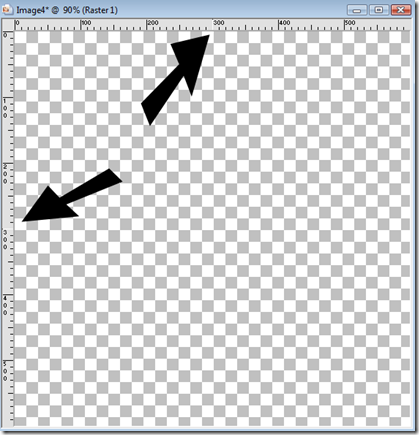
Step 2 – Using your selection tool create a circle making sure your starting points are at 300 and 300 then pull outward until you reach just before the edge of your workspace.

When you position your cursor your 300 vertical and 300 horizontal marks will appear as white.  That is the absolute center of your canvas.  Then you click with your mouse and pull outward.
image

After you pull outward your “marching ants” will appear as below.


image

Step 3 – Go to Selections/Modify/Shape Based Anti-alias and check Outside.  Press OK.  This will removed jagged edges along our selection area. Then Flood Fill with the color or pattern of your choice.

image

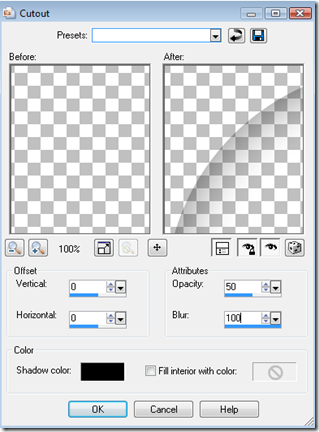
Step 4 – Keeping your selection add a new raster layer.  Then select Effects/3D Effects/ Cut Out.  Use the following settings:
image

Press OK.  Then Select None and then select Layers/Merge/Merge Down.

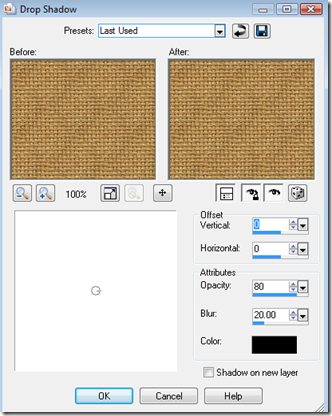
Step 5 – Repeat the above creating a smaller circle, flood fill, new raster layer, effects, 3D effects, Cutout.  BEFORE YOU MERGE:  Select the layer you just flood filled and then select Effect/3D Effects/Drop Shadow and use the following settings:
image

Then select the layer with the Cut Out and select Layers/Merge/Merge Down.  Then use Layers/Merge/Merge Down again so that all layers are now one layer and your bottom and top buttons are mounted on top of each other.

Step 6 – Create a New Raster Layer.  Using your selection tool, starting at your midpoint of 300 horizontal and 300 vertical create a small circle.  (This is the start of your button holes).  Then Selections/Modify/Shape Based Anti-alias/Outside.Flood Fill with WHITE.   Then Select None. Your image should appear as below,

image

Using your Pick Tool (Mover if using versions below X), change your position x to 200.

image 

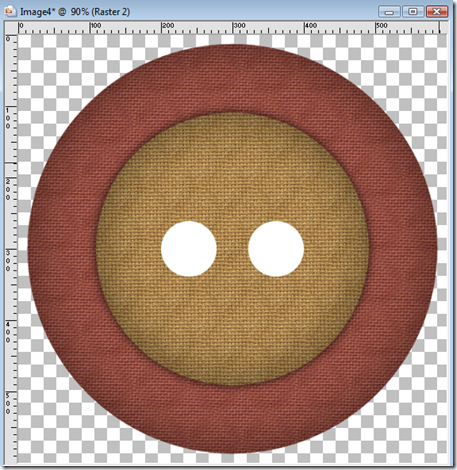
Step 7 – Duplicate your small circle layer and then select Image/Mirror then Layers/Merge/Merge Down.  You should now have an image that looks like the one below.
image

Step 8 – Using your magic wand, select the two white circles and then select the layer that has your button on it and press DELETE. Keeping your selection add a New Raster Layer and select Effect/3D Effects/Cutout and use the following settings:

image

Make sure the layer with your two small circles is invisible. Select the layer with your new small cut outs and select Effect/3D Effects/Drop Shadow and use the same settings for your previous drop shadow.  Then Layers/Merge/Merge Visible.  Your button is now complete.

image

If you want to add thread to your button, add a new raster layer and using your center markers (300 x 300) create a rectangle and then use Selections/Modify/Feather/20 and flood fill with the color of your choice. Your image should appear as below.

image

Keeping the area selected use Effects/Artistic Effects/Halftone and use the following settings:

image

Keeping the area selected use Adjust/Add Remove Noise/Add Noise and use the following settings:

image

Then Select None and using your Script tool…..run the Center Layer Script that comes with PSP. (If you cannot find this it is under Scripts Restricted/Center Layer).  Your image should appear now as below.

image 

Now let’s smooth out the area and make is appear as if it is inside the circles.  Select the layer that has your small white circles we used to make our button holes.  Using your magic wand select both the white circles and then Selections/Invert.  Return to the layer that has your thread on it. Using your eraser tool erase around the outside of the circles just to the left and right.

image

Select None.  Then add a drop shadow to your thread layer using the same drop shadow properties as before. 

Then select the layer with your two small circles we used for the holes and Delete Layer.  Then Layers/Merge/Merge Visible and your button with thread is now complete!

image

You can play around with different settings for your cut outs and drop shadows and threading.  Play around and change it up as you need, but most importantly…..have fun!

I created a script while writing this tutorial.  You can click HERE  to download it for FREE! Works in PSP 9 and Up.

Monday, July 19, 2010

Tweed Bow N Ribbon Pieces Script

RDD-TweedBowNRibbonPiecesDisplay
PRICE:  FREE
This script ends in layers.  It creates at 800 x 800 at 300 ppi. You select the color you want and three tweed pieces are made, one bow piece and two ribbon pieces.  Use for all your designing needs.
Works in:
JASC PSP 9
Corel PSP X – X3
USES:
PU/CU/S4H/S4O/Candy Wrapping
See TOU for complete details.

Click HERE  to snag.

Saturday, July 17, 2010

Ribbon – Tweed with Border

RDD-TweedRibbonDisplay
PRICE:  FREE
This script ends in a merged file.  12" x 1.25"  at 300 ppi. You select the color of the ribbon and the color of your thread. . Use for any of your designing needs.
Works in:
Jasc PSP 9
Corel PSP X- X3
USES:
PU/CU/S4H/S4O/Candy Wrapping
See TOU for details.

Click HERE  to snag.


Sunflower Script

RDD-SunflowerDisplay
PRICE:  FREE
This script ends in a merged file.  300 ppi. Use any colors for your flower. Use for any of your designing needs.
This is a different kind of a script.  With this script you can make various types of sunflowers.  Nice huh?
Works in:
Jasc PSP 9
Corel PSP X- X3
USES:
PU/CU/S4H/S4O/Candy Wrapping
See TOU for details.

Click  HERE to snag.


Sun and Moon Paper Maker

RDD-SunAndMoonPaperDisplay
PRICE: FREE
This script ends in a merged file.  Use any colors for your paper.  Makes one 12 x 12 paper. 300 ppi.  Use for any of your designing needs.
Works in:
Jasc PSP 9
Corel PSP X- X3
USES:
PU/CU/S4H/S4O/Candy Wrapping
See TOU for details.

Click HERE  to snag.


Small Tied Ribbon Script

RDD-SmallTiedRibbonDisplay
PRICE:  FREE
This script ends in a merged file. 300 ppi.  Use any colors or patterns for your ribbon. Use for any of your designing needs.
Works in:
Jasc PSP 9
Corel PSP X- X3
USES:
PU/CU/S4H/S4O/Candy Wrapping
See TOU for details.

Click HERE  to snag.


Shasta Daisy Script

RDD-ShastaDisplay
PRICE:  FREE
This script ends in a merged file.  300 ppi. Use any colors for your flower, center and leaves. Use for any of your designing needs.
Works in:
Jasc PSP 9
Corel PSP X- X3
USES:
PU/CU/S4H/S4O/Candy Wrapping
See TOU for details.

Click HERE  to snag.


Scalloped Ribbon Border Script

RDD-ScallopedRibbonBorderDisplay
PRICE: FREE
This script ends in a merged file.  3600 pixels in length.  300 ppi. Use any colors or patterns for your ribbon. Use for any of your designing needs.
Works in:
Jasc PSP 9
Corel PSP X- X3
USES:
PU/CU/S4H/S4O/Candy Wrapping
See TOU for details.

Click HERE  to snag.


Scalloped Frames

RDD-ScallopedFramesDisplay
PRICE:  FREE
This script ends in a layered file.  Use any colors or patterns for your frames.  Makes 2 different frames with 1 script!  Use for any of your designing needs.  300 ppi.
Works in:
Jasc PSP 9
Corel PSP X- X3
USES:
PU/CU/S4H/S4O/Candy Wrapping
See TOU for details.

Click HERE  to snag.


Ribbon Flower Script

RDD-RibbonFlowerDisplay
PRICE:  FREE
This script ends in a merged file.  300 ppi. Use any colors or patterns for your ribbon flower. Use for any of your designing needs.  This is one of my FAVORITES!
Works in:
Jasc PSP 9
Corel PSP X- X3
USES:
PU/CU/S4H/S4O/Candy Wrapping
See TOU for details.

Click HERE  to snag.


Ribbon 6 Script

RDD-Ribbon6Display
PRICE:  FREE
This script ends in a merged file.  3600 pixels in length.  300 ppi. Use any colors  for your ribbon. Makes 1 felt appearance ribbon with polka dots. Use for any of your designing needs.
Works in:
Jasc PSP 9
Corel PSP X- X3
USES:
PU/CU/S4H/S4O/Candy Wrapping
See TOU for details.

Click  HERE  to snag.


Ribbon 5 Script

RDD-Ribbon5Display
PRICE:  FREE
This script ends in a merged file. 3600 pixels in length.  300 ppi.  Use any colors or patterns for your ribbon. Makes 1 felt appearance ribbon. Use for any of your designing needs.
Works in:
Jasc PSP 9
Corel PSP X- X3
USES:
PU/CU/S4H/S4O/Candy Wrapping
See TOU for details.

Click HERE  to snag.


Ribbon 4 Script

RDD-Ribbon4Display
PRICE: FREE
This script ends in a merged file.  3600 pixels in length. 300 ppi. Use any colors or patterns for your ribbon. Use for any of your designing needs.
Works in:
Jasc PSP 9
Corel PSP X- X3
USES:
PU/CU/S4H/S4O/Candy Wrapping
See TOU for details.

Click HERE  to snag.


Ribbon 2 Script

RDD-Ribbon2Display
PRICE: FREE
This script ends in a merged file.  3600 pixels in length. 300 ppi. Use any colors or patterns for your ribbon. Use for any of your designing needs.
Works in:
Jasc PSP 9
Corel PSP X- X3
USES:
PU/CU/S4H/S4O/Candy Wrapping
See TOU for details.

Click HERE  to snag.


Ribbon 1 Script

RDD-Ribbon1Display

PRICE:  FREE!

This script ends in a merged file.  3600 pixels in length. Use any colors or patterns for your ribbon. Use for any of your designing needs.

Works in:

Jasc PSP 9

Corel PSP X- X3

USES:

PU/CU/S4H/S4O/Candy Wrapping

See TOU for details.

Click HERE  to download for FREE!

Laces Script

RDD-LacesDisplay
PRICE:  FREE
This script ends in a layered  file.  Use any colors or patterns for your laces. Makes 3 different lace styles with 1 script. Use for any of your designing needs.
Works in:
Jasc PSP 9
Corel PSP X- X3
USES:
PU/CU/S4H/S4O/Candy Wrapping
See TOU for details.

Click HERE  to snag.


Grunge Paper Maker

RDD-GrungePaperMakerDisplay
PRICE: FREE
This script makes 4 grunge style papers in two colors with 1 script!  Papers are 12 x 12 at 300 ppi. Select your foreground color and background color and then run the script.  Use these papers for any of your designing needs!
Works in:
Jasc PSP 9
Corel PSP X - X3
USES:
PU/CU/S4H/S4O/Candy Wrapping
See TOU for complete details.

Click  HERE  to snag.


Gift Bow Script

RDD-GiftBowDisplay
PRICE:  FREE
This script ends in a merged file.  Use any colors or patterns for your gift bow.  Makes 2 gift bows with ribbons on the side for borders and one gift bow without ribbons on the side. ! Use for any of your designing needs.
Works in:
Jasc PSP 9
Corel PSP X- X3
USES:
PU/CU/S4H/S4O/Candy Wrapping
See TOU for details.

Click HERE  to snag.


Frames 3 Script

RDD-Frames3Display
PRICE:  FREE
This script ends in a merged file.  Use any colors or patterns for your frames.  Makes 3 Felt Appearance Frames with 1 script! Use for any of your designing needs.
Works in:
Jasc PSP 9
Corel PSP X- X3
USES:
PU/CU/S4H/S4O/Candy Wrapping
See TOU for details.

Click  HERE  to snag.